Instructions for completing Production Manager Roundtables Metric Spreadsheet:
- All yellow highlighted cells are to be completed. If you only have 5 jobs, only complete 5 rows.
- Be sure you can see all columns
- Employee List tab uses A – H
- Data Tab uses A – AG
- Complete Employee List Tab First
- If you have more Employees than will fit on the Employee List Tab, use the Expanded Version of the file
- Begin to enter data from Cell A4 (See below for more detailed information)
- Cell A4 is the last day the report is for (Example Dec 31, 2021)
- Cell B8 is your company’s Projected GP % for the year
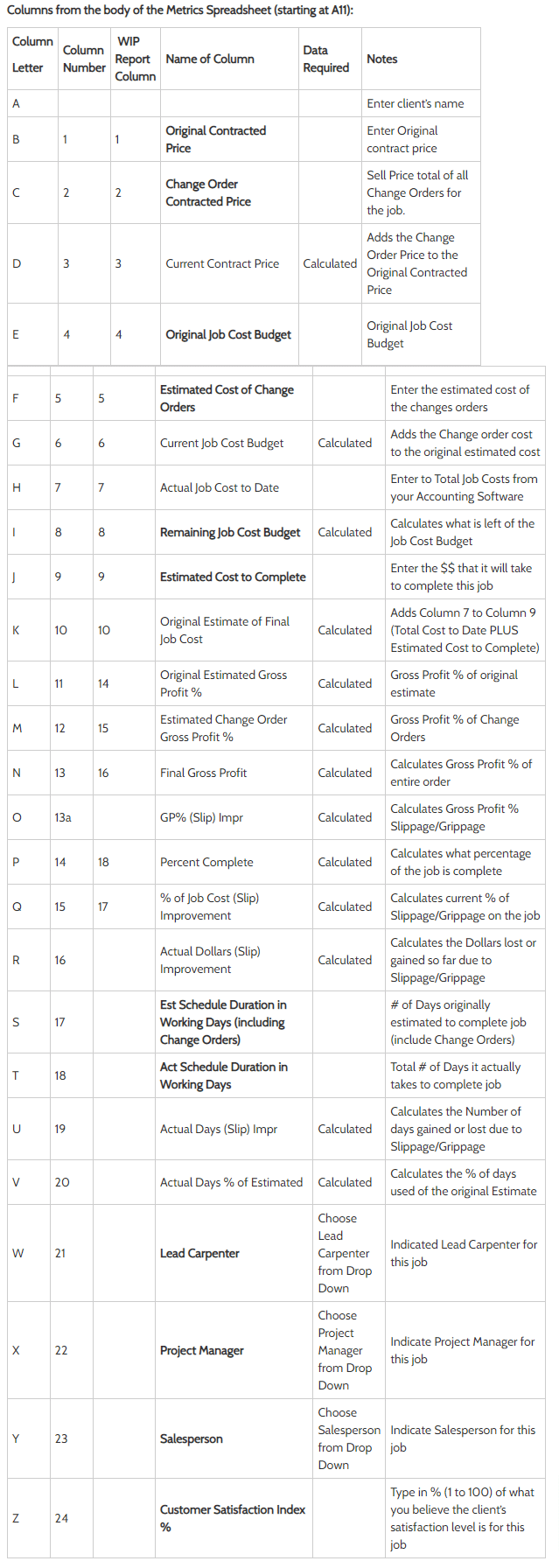
- Cell A11 starts the data entry for each job.
- Include all jobs completed and started as per the instructions in cell A6. (If you do more than 44 jobs during that time the lower section can be expanded to accommodate up to 154 rows. If you do small jobs as well as big jobs, you may want to decide a cut off dollar amount such as everything over $5000.)
Columns from the body of the Metrics Spreadsheet (starting at A11):